
The Lifecycle of an ORM Call in Odoo
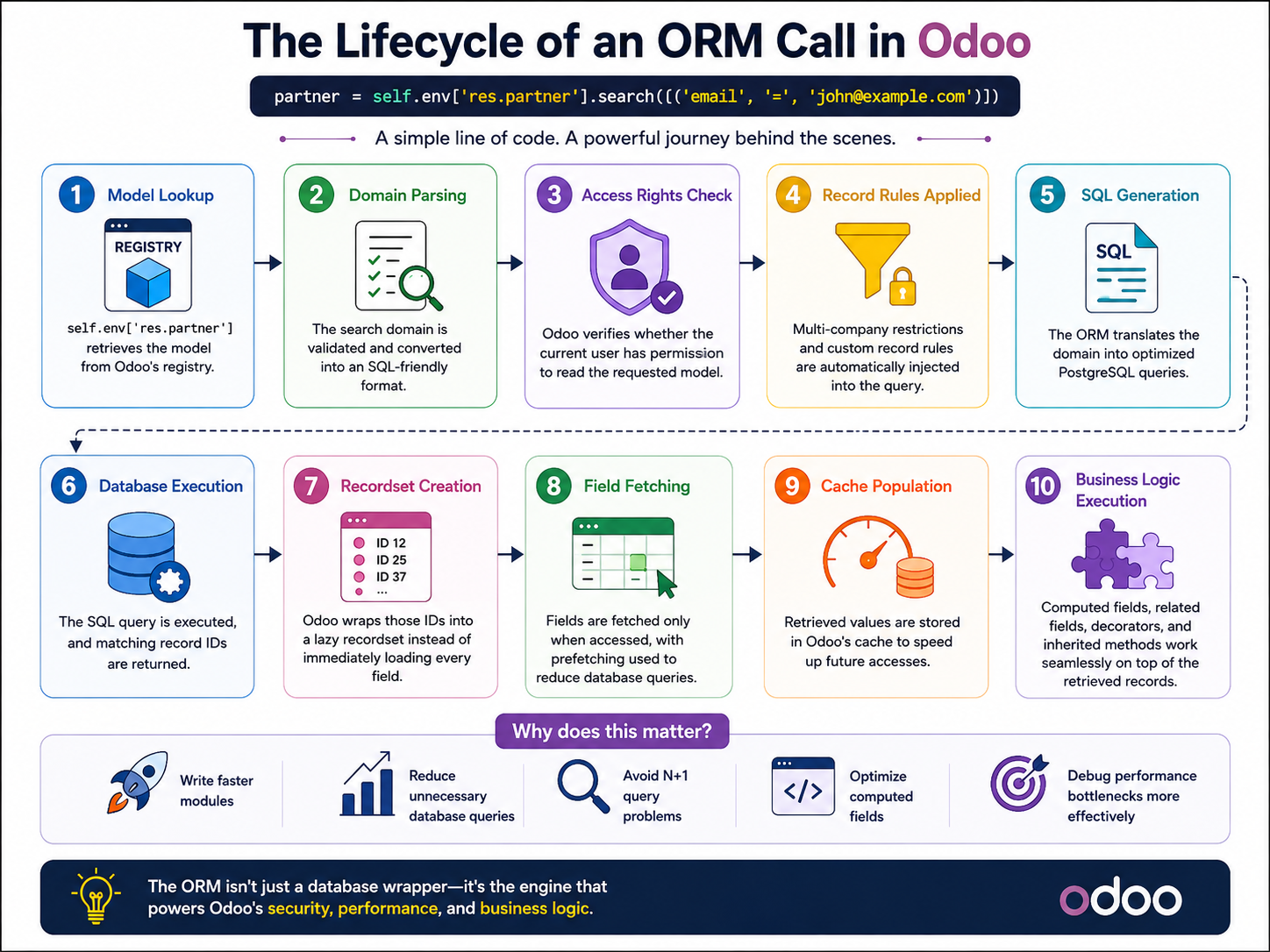
Every time you write code like:
partners = self.env['res.partner'].search([('customer_rank', '>', 0)])
a lot more happens behind the scenes than simply querying a database.
Understanding the ORM lifecycle helps developers build faster, cleaner, and more scalable Odoo applications.
Let's explore the complete journey of an ORM call.
1. Your Python Code Starts the Request
Everything begins inside your custom module.
Example:
customers = self.env['res.partner'].search([
    ('is_company', '=', True)
])
Instead of writing SQL directly, you're calling the Odoo ORM.
This abstraction keeps your code database-independent, secure, and easier to maintain.
2. The Environment (env) Takes Control
The env object is one of the most important components in Odoo.
It contains:
- Current database cursor
- Logged-in user
- Context
- Registry of models
- Cache
When you access:
self.env['res.partner']
Odoo retrieves the model from its registry and prepares it for execution.
3. The ORM Builds the SQL Query
The ORM converts your domain into SQL.
Example:
[
    ('is_company', '=', True),
    ('active', '=', True)
]
becomes something similar to:
SELECT id
FROM res_partner
WHERE is_company = TRUE
AND active = TRUE;
You never write this SQL manually—the ORM generates it automatically while also respecting:
- Record rules
- Access rights
- Multi-company restrictions
- Active records
- Context filters
4. PostgreSQL Executes the Query
Once generated, the SQL is sent to PostgreSQL.
The database:
- Optimizes the query
- Uses indexes if available
- Reads matching rows
- Returns only the requested data
At this point, Odoo is simply waiting for PostgreSQL to finish execution.
5. ORM Creates Recordsets
Instead of returning raw dictionaries, Odoo wraps the database rows inside recordsets.
Example:
partners = self.env['res.partner'].search([])
Now you can simply write:
for partner in partners:
    print(partner.name)
Recordsets provide an object-oriented interface to your database records.
6. Cache Reduces Future Queries
One of Odoo's biggest performance advantages is its cache.
The first time you access:
partner.name
the value is fetched from PostgreSQL.
The next access usually comes directly from memory.
This dramatically reduces unnecessary database queries and improves performance.
7. Computed Fields and Business Logic Execute
If the requested fields include computed fields:
fields.Char(compute="_compute_total")
Odoo automatically executes the compute methods before returning the final values.
Similarly:
- Related fields
- Onchange logic (UI)
- Constraints
- Inverse methods
may also participate depending on the operation being performed.
8. Results Are Returned to Your Code
Finally, the ORM returns the processed recordset.
You can now:
customers.write({
    'customer_rank': 10
})
or
return customers
without worrying about SQL syntax or database connections.
Everything is managed by the ORM.
Why Understanding the ORM Lifecycle Matters
Knowing what happens behind every ORM call helps you:
- Write more efficient code
- Reduce unnecessary database queries
- Avoid N+1 query problems
- Optimize computed fields
- Improve module performance
- Debug complex issues more easily
A small optimization in ORM usage can make a significant difference in large production databases.
Conclusion
The Odoo ORM is much more than a database wrapper.
Every ORM call passes through multiple layers—from the Environment and model registry to SQL generation, PostgreSQL execution, caching, computed fields, and finally back to your Python code.
Understanding this lifecycle enables you to build faster, cleaner, and more scalable Odoo applications while taking full advantage of everything the framework provides.
Master the ORM, and you'll master Odoo development.